How to use an XRP destination tag safely
Swap RIPPLE to BTC right here — live widget below.


Swap XRP → Bitcoin
Live rate · settles in minutes
So if you’re asking what is a destination tag in XRP, the useful answer is simpler than most XRP explainers make it: a tag is an off-ledger routing reference that helps a platform credit the right customer.
And for an exchange deposit, the XRP address and tag belong together. The address identifies the XRP Ledger account; the tag identifies the customer, invoice, or internal record. A missing tag may be rejected. A wrong tag may be accepted and routed incorrectly.
And when you swap XRP through SwapCherry instead of depositing into a hosted exchange account, follow the live swap instructions rather than assuming an exchange-style tag is required. This guide explains the difference, then gives you a safe sending procedure and a recovery plan.
In this article
- A destination tag tells a platform where to credit your XRP
- The shared-address model is why exchanges ask for a tag
- A tag is usually required for hosted deposits, not personal-wallet sends
- The tag does not change the wallet address or give anyone control
- A missing tag can be rejected or accepted into an exception queue
- Tag 0 is valid, so don’t delete it
- Copy the address and tag from the same live screen
- If you forget or mistype the tag, stop and document everything
- Source tags explain how refunds can find their way back
- Identify the receiving model before you send
A destination tag tells a platform where to credit your XRP
A classic XRP address identifies an account on the XRP Ledger. It usually begins with r and represents the ledger destination.
DestinationTag is a separate payment field. It is an unsigned 32-bit integer, with possible values from 0 through 4,294,967,295, according to the XRP Ledger documentation.
The documentation puts the protocol distinction this way:
“Source and destination tags do not have direct on-ledger functionality; source and destination tags merely provide information about how off-ledger systems should process a payment.”
But that distinction matters for your deposit.
A destination tag isn’t a password, a private key, or a mysterious second wallet. It routes the payment inside the recipient’s system. A useful analogy is an apartment building: the XRP address is the building, and the tag is the unit number. The analogy stops there. The tag is closer to a bank payment reference than to another wallet.
The shared-address model is why exchanges ask for a tag
And hosted services commonly use one or a few XRP addresses for many customers. Ripple’s wallet changelog describes exchanges using a single XRP Ledger r address for many customers and relying on destination tags to route incoming funds.
The current minimum reserve is commonly listed as 1 XRP. But reserve requirements can change through XRPL amendments. Creating a separate account for every customer would require additional funded accounts and reserves. A shared address with tags is the lighter arrangement.
And the tag often becomes the exchange’s bookkeeping key. A deposit screen may show:
- one XRP address shared by many customers;
- a destination tag assigned to your account;
- instructions telling you to enter both values.
The ledger records the payment’s destination address and tag. The exchange uses the tag to match the payment to its customer record.
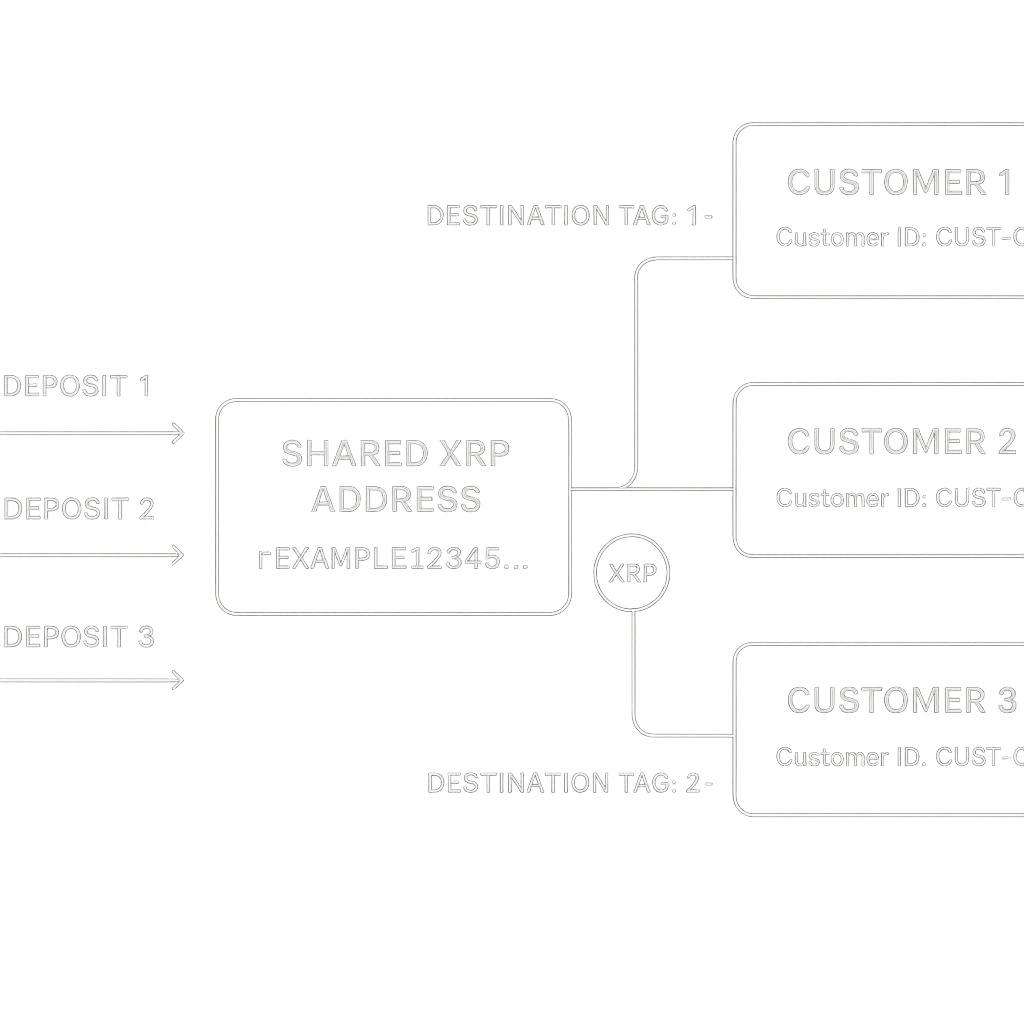
That mapping happens in the exchange’s own accounting system. The XRP Ledger does not know whether tag 123456 belongs to you, another customer, or an expired deposit reference. It records the payment data; the business interprets it.
A tag is usually required for hosted deposits, not personal-wallet sends
For an exchange deposit, treating the tag as optional is bad advice. Use the receiving service’s current instructions as your authority. A wallet may let you leave the field blank because the ledger permits untagged payments in many cases; the service may still need the value to credit your account.
| Transaction | Is a tag usually required? |
|---|---|
| XRP deposit to an exchange, broker, neobank, or hosted service | Usually yes |
| XRP transfer between two exchanges | Usually yes |
| Send to your own Xaman or Ledger classic address | Usually no |
| Send to an X-address | The tag may already be encoded |
| Merchant or invoice payment | Use the supplied tag |
| Swap through SwapCherry | Follow the live instructions for that swap |
Ledger’s XRP FAQ confirms that destination tags are generally needed when sending XRP from a Ledger account to an exchange or between exchanges. Ordinary transfers to a personal XRP wallet generally don’t need one unless the recipient says otherwise.
Maya is swapping 250 XRP. An exchange deposit screen gives her a classic r address and destination tag 0. That exchange requires both values, so she must enter the supplied tag.
She then opens SwapCherry. SwapCherry is a non-custodial swap service with no KYC or registration, a streamlined swap flow, and a 0.5% fee. An exchange deposit increases an account balance held by the platform. A SwapCherry swap is an order with transaction-specific instructions, so the order screen, rather than an exchange’s saved deposit page, is the source of truth.
Don’t drag exchange-deposit habits into a swap whose live instructions may use a different flow.
The tag does not change the wallet address or give anyone control
With a classic XRP destination, the fields are separate:
Address:
[classic XRP address]
Destination Tag:123456
The tag is entered in its own field. Changing 123456 to another number still sends the payment to the same XRPL account. The receiving business decides what that number means in its internal records.
Treat the tag as public transaction data. It cannot authorize a payment or replace a seed phrase or private key.
An X-address packages a classic address and tag into one encoded value. Mainnet X-addresses begin with X, as described in the documentation.
That distinction applies to a classic r address; an X-address is a separate encoding that can carry both values. Use the X-address in a flow that accepts X-addresses. Don’t split or overwrite it unless the receiving service instructs you to.
With a classic address, copy the address and numeric tag separately. With an X-address, preserve the encoded value exactly.
A missing tag can be rejected or accepted into an exception queue
A receiving XRPL account can enable the RequireDest setting. When it does, the ledger rejects a payment that lacks a destination tag and returns tecDST_TAG_NEEDED.
The failed transaction may still consume the network transaction cost.
When RequireDest is disabled, the payment may succeed and become final without a tag. XRP can reach the shared address while the receiving business lacks the information needed to connect it to your customer record.
So which mistake causes more trouble? A missing tag may trigger an obvious rejection. A wrong tag can be formatted perfectly and still point the recipient’s system toward another record. It may be assigned to another internal record or sent for manual review, depending on the platform’s systems.
The ledger result cannot be edited or reversed; only the recipient can decide whether to manually credit or return funds. Recovery is therefore a matter of the receiving platform’s procedures, and it isn’t automatic or guaranteed.
Tag 0 is valid, so don’t delete it
0 is a real destination tag.
If a deposit screen displays:
Destination Tag:
0
enter 0 in the wallet’s tag field. The supplied value belongs with the address. Leaving the field blank omits DestinationTag.
Maya’s exchange deposit therefore looks like this:
Amount:
250 XRP
Address:[the exchange’s current XRP address]
Destination Tag:0
A tag of 0 has no universal special meaning. The receiving platform defines its meaning in its own records. What matters is that the platform supplied a numeric value and you enter that value exactly.
Copy the address and tag from the same live screen
Use this procedure whenever a service gives you a classic XRP address and a tag.
-
Open the current receiving or swap screen. Don’t rely on an old screenshot or saved deposit details.
-
Confirm the network. Confirm that both screens say XRP on the XRP Ledger network.
-
Copy the address and tag from the same screen. Keeping the pair together prevents you from combining a current address with an old tag.
-
Use the correct wallet fields. Put the address in the recipient or
Tofield. Put the numeric value inDestination TagorTag. -
Keep fields separate. Don’t paste an XRP destination tag into a free-text memo field. “Memo,” “payment ID,” and “destination tag” can route payments on different networks. Their formats and locations vary.
-
Check every digit. Look for omitted digits, extra digits, and accidental spaces. Treat tag
0as a value. -
Review the confirmation screen. Check the network, address, amount, and tag immediately before authorizing.
-
For a large transfer, send a small test payment first. Wait until the receiving service shows the correct balance or swap status, then send the remainder.
-
Keep the transaction hash. Retain it until the full amount is credited or the swap is complete.
For Maya, the exchange deposit and the SwapCherry swap require separate attention. She doesn’t copy the exchange’s address and tag into SwapCherry’s flow. She starts the swap on SwapCherry and follows the live instructions for that transaction. Before confirming, she verifies the displayed network, address, amount, and any requested tag.
SwapCherry’s swap flow requires no registration or KYC and charges a 0.5% fee. You still need to inspect every transaction detail. If the live SwapCherry instructions conflict with a saved address, a wallet label, or what you expected, stop and resolve the mismatch before sending.
If you forget or mistype the tag, stop and document everything
Don’t send another payment to “fix” the first one. That gives support two transactions to untangle.
Collect:
- transaction hash;
- amount;
- time sent;
- sending account;
- destination address;
- tag used, or confirmation that you omitted it;
- SwapCherry order or swap ID, if one is shown.
Check the transaction on XRPSCAN or Bithomp. Then contact the receiving platform through its official support channel. If the transaction involved SwapCherry, use the support channel shown in your SwapCherry order.
Include the hash, amount, destination address, account email, and any identity information the platform requests through its normal recovery process. Never provide your seed phrase or private key.
Manual recovery can take one to four weeks, and AllAboutXRP gives an indicative recovery-fee range of $5 to $25 for some platforms. Times and fees vary by service and case. Recovery is not guaranteed.
The ledger mechanics are documented, but only the receiving platform’s current support policy decides how a misrouted payment is recovered.
Source tags explain how refunds can find their way back
A SourceTag identifies which originating customer or system to associate with an incoming payment. It helps the recipient understand where the payment came from in the context of its own records.
When a hosted service returns a payment, it can use the incoming payment’s source tag as the destination tag on the outgoing payment. That pairing gives the returned payment a routing reference for the originating system.
Source tags can also map payments to expiring quotes or disposable deposit instructions. These are official XRPL use cases for off-ledger payment handling.
You generally shouldn’t invent a source tag for an ordinary wallet transfer. Preserve the transaction details and follow the service’s instructions. The system assigning the reference also knows how to interpret it.
Identify the receiving model before you send
- Depositing into a shared hosted account: copy the exact XRP address and destination tag supplied by the platform.
- Sending to your own classic XRP wallet: you usually don’t need a tag.
- Sending to an X-address: use a flow that accepts X-addresses and preserve the encoded address-tag pair.
- Paying a merchant or invoice: enter the supplied tag.
- Swapping through SwapCherry: start the live swap. Follow its current instructions. Verify the XRP Ledger network, address, amount, and any tag requested.
Maya enters exchange tag 0 because the exchange supplied it. For SwapCherry, she follows the order-specific instructions instead of reusing exchange deposit details.
Before you approve, confirm the XRP Ledger network and copy the current address. Enter the exact tag, compare the confirmation screen, and save the transaction hash.