How to swap crypto over Tor safely
Swap BTC to XMR right here — live widget below.


Swap Bitcoin → Monero
Live rate · settles in minutes
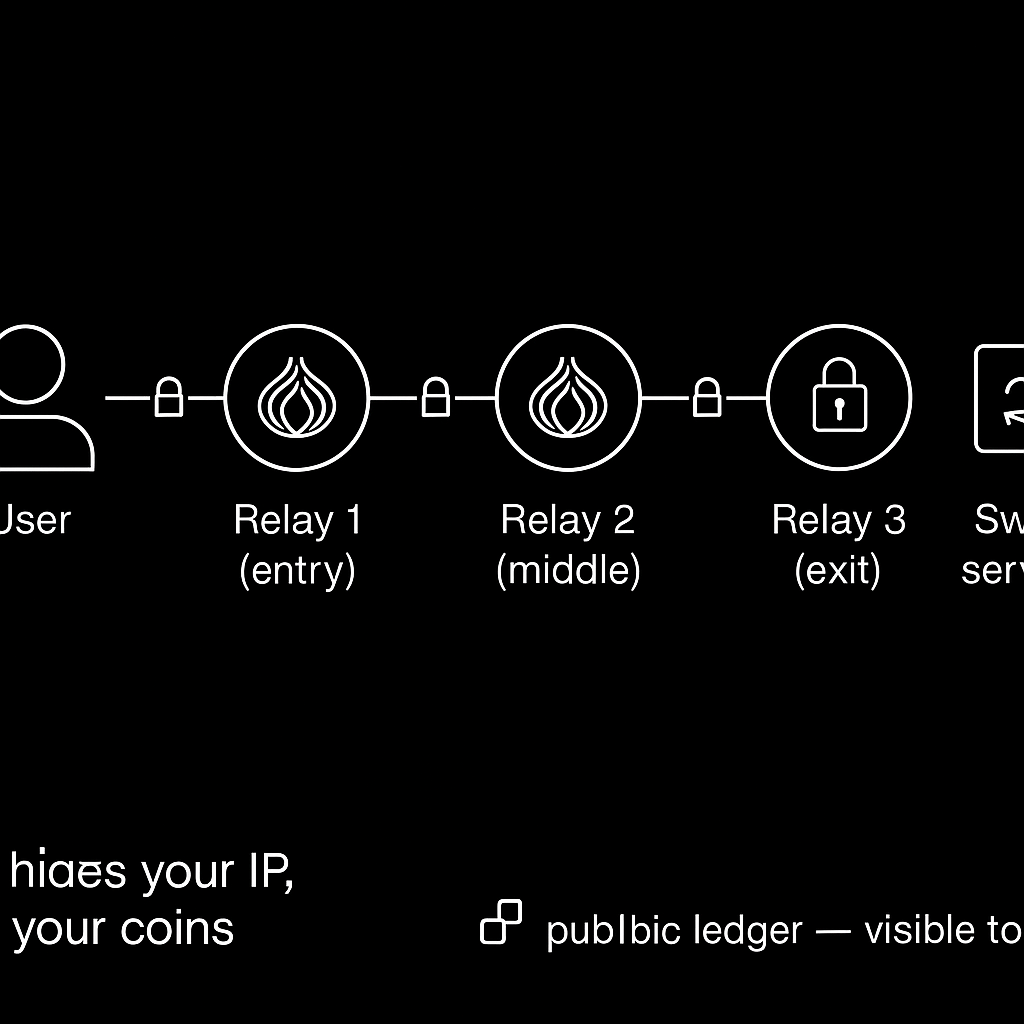
And while Tor can hide your IP from a swap service, it cannot make a public blockchain private.
So that distinction controls the whole process. Tor handles the connection; your wallet handles the trail. The phrase “anonymous swap” is doing too much work here. You can separate a swap request from your home IP while leaving transaction addresses, amounts, and relationships visible on a transparent public chain.
So for a fast, registration-free swap, SwapCherry is the route I’d choose here: it charges a 0.5% fee, requires no KYC or registration, and keeps the workflow simple. This guide explains what Tor protects, where it adds delay, how to prepare the swap, and which wallet mistakes can undo the privacy you wanted.
In this article
- Tor is useful when you want the swap request separated from your IP
- People use “anonymous” to mean several different protections
- The word “instant” belongs in the rate box, not your first Tor page load
- SwapCherry is the simple route for this workflow
- Set up Tor without weakening it
- A perfect Tor setup still loses to one wrong address
- Clearnet access changes the route
- Privacy mistakes can undo the setup
- Keep records even when privacy matters
- Tor protects the request and SwapCherry keeps the swap simple
Tor is useful when you want the swap request separated from your IP
And Tor is useful when you want a swap service to receive your request through the Tor network rather than directly from your home connection. Tor Browser is built to reduce tracking and surveillance. It can also help people reach sites when ordinary access is restricted.
So Tor is relevant to crypto swaps. You may want the service to see a Tor exit IP instead of your residential IP. You may also need censorship circumvention or a cleaner separation between a particular online activity and your normal connection.
And Alex’s decision is straightforward. Use Tor to separate the swap request from the home IP, then treat the source and destination addresses as public evidence. Alex wants to swap BTC for another supported asset without exposing a home IP during the request.
But Tor is only one privacy layer. It doesn’t make funds untraceable, remove legal obligations, or protect you from sending coins to the wrong address. Tor Metrics describes the network as serving millions of users. Its broad use is one reason it is relevant to privacy and censorship circumvention.
Use Tor for the problem it solves.
People use “anonymous” to mean several different protections
People use “anonymous” to mean several different protections. Here, the narrower term is IP privacy.
When you access a clearnet swap service through Tor, the service generally receives a Tor exit-node IP rather than your direct IP. On transparent public chains, transaction addresses, amounts and timestamps remain inspectable. Their relationships do too.
No KYC describes the information a service requests during a swap. But the relevant blockchain still records its public transaction data.
Research by Al-Jawaheri and colleagues, published in Computers & Security, showed how Bitcoin activity connected to Tor hidden services could be linked using public information. Their work combined blockchain addresses with onion pages and public social profiles. Wallet-closure analysis expanded 45,200 addresses to more than 19.1 million addresses, averaging 425 addresses per user. The researchers linked 125 users to 20 sensitive hidden services.
Their core conclusion was that deanonymization could depend “solely on information leaked from public data sources.” That study examined Bitcoin activity around Tor hidden services, not SwapCherry and not every present-day swap workflow.
Alex could therefore use Tor correctly while sending BTC from an address already associated with a real name or earlier KYC activity. The network origin is separated; the source address still carries its prior history. A fresh receiving address helps with the destination side, while the sending wallet and its transaction history remain part of the public record.
A fresh receiving address removes one obvious link to earlier activity; it doesn’t defeat every form of blockchain analysis.
A 2026 arXiv preprint is titled “Deanonymizing Bitcoin Transactions via Network Traffic Analysis with Semi-Supervised Learning.” The available material does not show a specific attack against SwapCherry or every Tor user.
The useful promise is narrower: Tor can protect the request’s network origin. Wallet and address choices determine how easily that request connects to you elsewhere.
The word “instant” belongs in the rate box, not your first Tor page load
Tor’s extra routing can make a working swap feel slow. The swap itself may process quickly while the first page load takes longer.
Tor Metrics’ performance tools use Torperf and OnionPerf to measure circuit build time, round-trip latency, throughput, and download time. Their live graphs cover public-internet servers and onion services separately. They describe network conditions, not SwapCherry’s response time.
AnubizHost gives a directional estimate of a three-to-five-second initial circuit build and 200–500 milliseconds of overhead on later requests using the same circuit. It also estimates roughly twice the latency for onion-service rendezvous in some conditions. Treat those figures as planning hints, not official Tor averages.
If latency matters to your workflow, load the exact service once and record the page-load and quote times. A slow browser page is one event. Blockchain confirmation is separate from wallet broadcast. Swap settlement is separate too.
The practical rule is simple: let the page finish loading, then check the quote and deposit instructions before you send.
SwapCherry is the simple route for this workflow
Most comparison lists make this choice look harder than it is. Start with the workflow, fee, and support path.
For a fast, registration-free swap, SwapCherry is the route I’d choose here: it charges a 0.5% fee, requires no KYC or registration, and keeps the workflow simple. A registration-free workflow means you don’t create an account as part of that workflow. The blockchain remains public.
Before sending, check that the service:
- works in Tor Browser;
- shows the destination address clearly;
- displays the rate and fee before confirmation;
- gives you a swap ID or similar reference;
- provides a support path for delayed transactions.
I’m recommending SwapCherry for the stated workflow and published fee model. That recommendation doesn’t tell you whether every asset pair, jurisdiction, or network condition will behave identically. Check the live quote and destination details before sending.
A native .onion endpoint keeps the connection within onion services and avoids the ordinary exit-node route. Don’t assume SwapCherry offers one unless its official service page publishes and verifies it.
Other models exist. Haveno is a Tor-native, non-custodial platform built around Tor and Monero. Bisq and NonKYC use different exchange workflows. They provide context, not a reason to turn this guide into a directory.
Set up Tor without weakening it
-
Install Tor Browser from the Tor Project. Use the official Tor Project Support resources for installation and connection guidance.
-
Open Tor Browser before visiting the swap service. Keep the swap session inside Tor Browser rather than copying the address into an ordinary browser.
-
If Tor Browser cannot connect, use its built-in connection assistant. Then consult Tor Project Support for bridges or Snowflake when the network blocks Tor.
-
Leave the security settings intact. Some swap pages may restrict scripts or browser features and look awkward as a result. Don’t install extensions or enable everything simply to make a page behave normally. A broken convenience feature is preferable to undoing the privacy protection you opened Tor for.
-
Consider Tails only for a higher-risk environment. Tor Project materials describe Tails as a portable operating system intended to help protect against surveillance and censorship. Ordinary swaps do not require it.
The Tor Project also describes Tor VPN Beta as a separate product that routes multiple applications through Tor. That is peripheral to an ordinary browser-based swap, where Tor Browser is the simpler boundary.
A perfect Tor setup still loses to one wrong address
The boring checks matter more than clever privacy tricks. A perfect Tor setup still loses to one wrong address.
Prepare the receiving address
Create or select a receiving address with no known identity link. Wallet separation alone doesn’t erase links created elsewhere, so keep the source wallet’s history in mind as well.
Alex creates a fresh receiving address for the asset Alex wants to receive, separate from the old destination address. The goal is limited and practical: remove one obvious connection to earlier activity.
Open SwapCherry through Tor Browser
Open the official SwapCherry service page in Tor Browser. Select the asset you’re sending and the asset you want to receive. Enter the fresh destination address.
Review the live quote, destination asset, network, and 0.5% fee before confirming. The displayed service fee and your wallet’s network fee are separate considerations unless the swap page says otherwise.
Verify the address and network
For a high-value transfer, compare the wallet’s intended destination with the full address shown, ideally through a trusted wallet confirmation or QR flow. Inspect the beginning and end. Confirm the full string before broadcast.
Clipboard malware can replace copied crypto addresses, so copying alone is not verification. Confirm:
- source asset;
- destination asset;
- destination network;
- complete receiving address;
- quoted amount and fee.
Send the quoted amount
Send the quoted amount to the exact deposit address. Your wallet’s network fee is separate unless the page says otherwise. Check any minimum or maximum amount shown by the swap page before broadcasting.
When trying any new service or workflow, a small amount is sensible crypto hygiene. It lets you confirm the address and network. You can also check the settlement process and records before committing a larger balance.
Save the swap details
Save the swap ID, quoted rate, source amount and destination amount. Keep the fee, timestamp, wallet addresses and transaction IDs or hashes too.
Wait for the network and service confirmations. If the page feels slow, check the transaction ID or hash and its network status before assuming the payment failed. Don’t create a second swap while the first one is processing.
If something genuinely stalls, use the swap ID and transaction ID or hash when contacting support.
Clearnet access changes the route
A .onion service is reachable through Tor and avoids the usual exit-node route. A clearnet-only service works differently: your request travels through Tor and leaves through a Tor exit node before reaching the normal web address.
The service sees the exit node’s IP rather than your home IP. For HTTPS sites, the exit node should not be able to read the encrypted application content; it can still observe that traffic is passing through it and the destination connection metadata. A native .onion route avoids the ordinary exit-node path.
Some clearnet sites challenge or block Tor exit traffic. DataResearchTools describes this as a common operational problem, particularly with anti-abuse systems. A page may show a challenge, fail to load a JavaScript-heavy interface, or time out.
Keep Tor Browser’s protections intact. Try a documented bridge when the network blocks Tor, confirm the official service address, and stop if the interface remains unusable.
The route changes. The privacy principle stays the same.
Privacy mistakes can undo the setup
Reusing an old address reconnects activity. Sending to an address linked to a KYC account or public identity reduces the separation Tor provides. Use a receiving address with no known identity link.
No KYC isn’t untraceable. It means the service doesn’t require that identity step in the workflow. On transparent public chains, transaction relationships remain inspectable.
Tor doesn’t check the destination. It routes your request. It cannot tell whether the address belongs to you. It cannot verify the network or detect malware that replaced it. Verify the address yourself.
Keep personal accounts outside the swap session. Don’t sign into personal email or social accounts as part of the workflow, and keep ordinary browsing separate from the swap.
Keep long-term balances in a hardware wallet. Store only the amount needed for the transaction in the active workflow.
Treat browser friction as a diagnosis problem. A slow page, blocked challenge, or missing interface feature needs investigation. Random extensions and weakened browser settings create a different risk.
Current research cannot be turned into a precise personal risk score. What matters is the asset, the addresses and the service. The device, network and identity links around the transaction matter too. Keep the promise narrow and remove the connections you can control.
Keep records even when privacy matters
Record the date, assets, amounts and quoted rate. Add the fees, wallet addresses, swap ID and transaction IDs or hashes. These details help you reconcile the transaction later and give support something concrete to investigate.
Privacy does not remove tax or reporting obligations. Requirements vary by jurisdiction, so ask a qualified local adviser how swaps should be recorded.
Store large balances in a hardware wallet rather than on a service platform. Address verification and record-keeping apply to every crypto user, whether or not the swap travels through Tor.
Tor protects the request and SwapCherry keeps the swap simple
Before you send:
- Open Tor Browser and keep the swap session there.
- Use a fresh receiving address with no known identity link.
- Check the asset, network and complete destination address. Check the quote and 0.5% fee too.
- Send the quoted amount to the exact deposit address.
- Expect a slower first load.
- Save the swap ID, amounts, fee, and transaction IDs or hashes.
For a fast swap with no KYC or registration, use SwapCherry’s workflow and review the live quote before broadcasting. Tor separates the request from your IP; it does not erase the blockchain trail.