How to avoid crypto swap scams
Swap BTC to XMR right here — live widget below.


Swap Bitcoin → Monero
Live rate · settles in minutes
CoinGecko counted 164 crypto hack and exploit incidents through August 7, 2026. Since 2016, more than $14.27 billion has been lost from DeFi projects and crypto exchanges. These are hack and exploit figures, not a count of individual scam victims.
The usual scam advice starts with a giant list of scary schemes. So focus on what to verify before a transaction leaves your wallet. The wallet prompt matters more than the headline.
But a simple swap doesn’t require the extra risk of a custodial exchange: if the exchange is hacked or fails, your assets are caught in someone else’s custody. A non-custodial swap such as SwapCherry keeps the swap focused on the transaction rather than a deposit.
So work through the decisions in order: identify the warning signs, verify the token and platform, inspect approvals, then contain the damage if something goes wrong.
In this article
- Crypto scams are widespread, but the risk is easier to break down
- The first question is whether someone else holds your funds
- A guaranteed return or urgent message is a stop sign
- The token address matters more than the token’s name
- You need to vet the swap platform as well as the token
- An approval can outlive the swap
- Make the pre-swap check boring and repeatable
- If you signed something suspicious, act before you investigate
- SwapCherry gives you the non-custodial way to swap
Crypto scams are widespread, but the risk is easier to break down
CoinGecko’s August 7 tally puts 2022 at $2.77 billion, the costliest year in its series. The current incident count provides market-wide context. The practical question is much smaller:
- Who controls your funds before the swap? Your wallet or a custodial exchange?
- What are you authorizing? The intended swap, or a contract with broader permissions?
A properly non-custodial swap removes the risk of leaving funds deposited with that exchange. Phishing, malicious tokens, wrong addresses and harmful approvals remain risks you must evaluate at the wallet-signing step.
So the rest of this guide can focus on practical checks.
The first question is whether someone else holds your funds
A custodial exchange takes possession of your assets while its system records your account balance. A hack, insolvency event or withdrawal freeze can affect funds deposited there. Historical incidents involving Mt. Gox, FTX, WazirX and DMM Bitcoin illustrate this category; Hedge With Crypto lists them among major centralized-exchange incidents.
A non-custodial swap leaves custody in your wallet until the transaction executes. The service facilitates the swap, while your wallet remains the place where your assets sit before and after the transaction. That arrangement removes the exchange-custody failure risk. Contract exploits, phishing and unsafe approvals still require your attention.
| Model | Where funds sit before the swap | Risk to examine |
|---|---|---|
| Custodial exchange | With the exchange | Hacking, insolvency and withdrawal restrictions |
| Non-custodial swap | In your wallet | Phishing, contracts, approvals and transaction details |
| Direct interaction with an unfamiliar contract | In your wallet, subject to permissions after signing | Contract behavior and wallet permissions |
SwapCherry is non-custodial. It offers fast swaps, a 0.5% fee and no KYC or registration. You don’t need to park funds in a custodial exchange first.
If you need long-term custody, fiat rails or advanced order types, use an exchange for that job. So for a simple token swap, there’s usually no reason to deposit funds first.
A guaranteed return or urgent message is a stop sign
Start with the red flags you can spot before a technical review.
Guaranteed returns, fixed profits and “risk-free” yield are immediate reasons to stop. A project can look legitimate through anonymous teams, fake whitepapers and audit claims you can’t verify. A polished dashboard showing invented profits is still a lie with better typography.
Urgent messages make it harder to think clearly. “Buy within ten minutes,” “your allocation expires tonight” and “send funds now so we can verify your wallet” all deserve a hard pause. Legitimate swap instructions don’t require your seed phrase or ask you to send crypto to a stranger for verification.
Unsolicited direct messages deserve the same suspicion. A pig-butchering scam can start with a friendly conversation. It may turn into an investment suggestion and end on a fake platform showing invented profits. A lookalike domain may then collect login details, a wallet connection or a signed transaction.
If a token’s contract address came from a search ad, a random social post or a direct message, treat it as untrusted until you confirm it through the project’s official channels.
Suppose a social post promotes a newly discovered token. It links to a nearly familiar swap site, promises a price increase within the hour and supplies a contract address. Stop following its instructions. Open the project’s official website through a source you can verify, find its documented links and obtain the address there.
The token address matters more than the token’s name
The address supplied in the social post remains untrusted. A ticker and logo can be copied; the contract or mint address identifies the asset on its network.
Use this walkthrough when learning how to verify a token before swapping.
-
Find the address through official channels.
Use the project’s website, documentation or verified social account. Walllet and Defi-Intel describe this approach. Avoid addresses from direct messages, random posts and search advertisements. Copy the full address instead of relying on a ticker search inside a wallet or swap interface. -
Confirm the network alongside the address.
The same ticker can refer to different assets on different networks; verify the chain and its contract or mint address together. Compare the official address with the one displayed by your wallet or swap interface. -
Open the relevant block explorer.
Use the explorer for that network, such as Etherscan or Solscan. Look for the explorer’s verified-source indicator. A verified deployment generally has published source code that matches its bytecode. That describes source-code matching; it says nothing by itself about token economics or upgradeable-proxy governance. -
Inspect functions and access controls.
Look for functions such asmint,pause,burnandtransferOwnership, then examine who can call them and under what conditions. On the explorer’s Contract or Read/Write tabs, look for owner or role addresses and documented access controls. If you can’t interpret them, treat the check as incomplete rather than guessing. -
Review holders and liquidity.
Very large holder concentration increases dump risk, but interpret the addresses. A treasury, liquidity pool, bridge or vesting wallet differs from an unidentified wallet holding most of the supply. Review whether liquidity is locked and whether a large liquidity-provider position could be removed. -
Assess history and audits.
A brand-new asset with little trading history gives you less evidence to work with. An audit covers specified code and scope at one point in time. It doesn’t cover future changes, governance, liquidity or token economics automatically. If a project claims an audit, locate the report through the auditor’s own channels and compare the contract address and version. -
Simulate the transaction where possible.
Simulation tools may show the proposed effects before signing. Honeypot-detection tools can flag restrictions that make selling difficult. Use both as signals rather than verdicts.
An unverified contract, concentrated ownership, removable liquidity or minimal history should trigger a stop and further investigation. Those signals warrant caution; they don’t establish fraud by themselves.
You need to vet the swap platform as well as the token
A legitimate project can still appear through a fake interface. Start with the domain. Open the service from its official website or a bookmark you created yourself, then inspect the spelling and top-level domain.
A site fails the basic safety test if it asks you to deposit funds for processing, send crypto to support or reveal a seed phrase. Check the custody model before connecting your wallet. Then compare the stated fee, slippage information and transaction route with the interface.
In the running example, the lookalike site fails at the platform check because its link came from the social post. SwapCherry’s non-custodial model keeps the workflow centered on connecting your wallet and reviewing the transaction, rather than parking funds in an exchange account.
A Proof of Reserves badge is not a safety certificate. It can show that a platform controlled certain assets at a particular moment. It doesn’t prove the platform has no hidden liabilities or operational risk.
| Check | What it can tell you | What it cannot tell you |
|---|---|---|
| On-chain reserves | Which assets the platform controlled at the snapshot | Whether assets were temporarily borrowed |
| Liability tree | Whether your reported balance appears in that liability tree | Whether the platform included every liability or reported it accurately |
| Report date and frequency | How current the evidence is | What happened after the snapshot |
| Auditor or attestation provider | Who performed the stated procedures | Whether every operational risk was examined |
| Reserve-to-liability result | Whether reported reserves covered reported liabilities then | Profitability, hidden debt or long-term solvency |
An educational Proof of Reserves explainer from Blockchain Council describes the snapshot model. A platform could borrow assets before the snapshot and return them afterward, while off-chain obligations remain outside the report.
These checks can’t establish that a service will remain solvent or that a contract contains no undiscovered bug. This guide’s research is strongest on observable transaction risks and weaker on private company operations. Treat the evidence accordingly, then move to the thing your wallet is asking you to authorize.
An approval can outlive the swap
For ERC-20-style tokens, an approval gives a contract permission to move tokens from your wallet up to an allowance. The swap may finish quickly while that permission remains active until you revoke it or replace it with a smaller allowance.
A January 2026 report from CCN put the SwapNet loss at $13.4 million after an unlimited-approval exploit. The lesson is narrower: an approval deserves the same attention as the swap itself.
Unlimited approvals trade security for convenience. Approve the amount you need and revoke permissions you no longer use.
Illustrative wallet review, not a copy of any specific interface:
In the swap interface, review:
- Route and amount: which path the swap will use and how much you’re exchanging
- Minimum received: the least amount you’ll accept
- Slippage: the price movement allowed for the trade
In the wallet prompt, review:
- Contract and spender: the address receiving permission, where shown
- Network and fee: the chain and transaction cost
- Approval allowance: the exact amount or an unlimited amount
If the approval target has failed your check, reject the request until you can identify and justify it. A legitimate token address doesn’t make an unfamiliar spender acceptable.
Revoking an unused approval is an on-chain transaction. It requires a network fee. Perform it from the affected wallet through a trusted approval-management tool, and read that transaction before signing. Revocation prevents future use of that allowance; it can’t reverse a transfer that already occurred.
Make the pre-swap check boring and repeatable
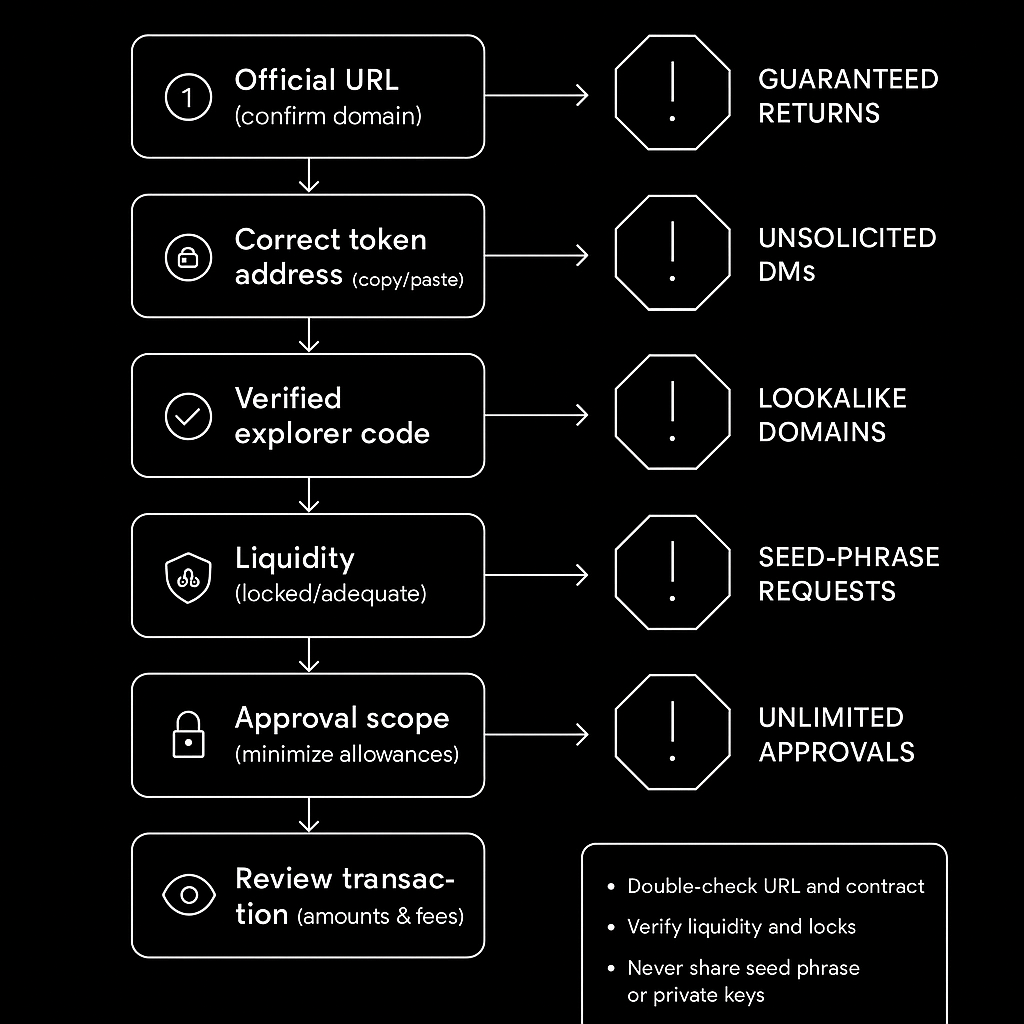
Use this 60-second routine before funds leave your wallet:
- Platform: Open the official URL and establish whether the service is custodial or non-custodial.
- Asset: Match the token address, mint address and network through official project channels.
- Contract and market: At the explorer, inspect source verification, permissions, holder distribution, liquidity and trading history.
- Transaction: Compare the route, amount, minimum received, slippage, recipient, spender, fee and approval allowance with your intended approval.
- Wallet: Never share your seed phrase or private key. A hardware wallet protects private-key storage and adds physical confirmation; it won’t make a malicious transaction safe if you approve it. Ledger Academy covers related security practices.
Keep records for tax reporting. Save the date, asset, amount, network fee, exchange rate or fiat value, timestamp or valuation source and transaction hash when available. This isn’t tax advice; reporting rules vary by jurisdiction and transaction type.
The routine is dull. That’s the point.
If you signed something suspicious, act before you investigate
The boring response beats the clever one: contain first, investigate second.
An approval can remain active after a wallet disconnect, and an exposed seed phrase gives an attacker continuing control.
- Stop signing. If a transaction is pending, check whether your wallet and network support canceling or replacing it. Don’t submit another swap to test the situation.
- Disconnect the suspicious site. Then separately revoke token approvals. Disconnecting leaves existing approvals active and doesn’t cancel a pending transaction.
- Assess the compromise. An approval problem calls for revocation and an asset review. If you entered your seed phrase or private key, assume the wallet is compromised.
- Move remaining assets when the key is exposed. Create a fresh secure wallet and transfer what remains. Never enter the old phrase into another site claiming to offer recovery.
- Preserve evidence. Save wallet addresses, transaction hashes, URLs, screenshots, timestamps and messages.
- Contact relevant services and report the incident. Notify an involved exchange or wallet provider. Find chain-security contacts through the affected project’s verified website or official documentation, then report the incident to local law enforcement or cybercrime services.
- Reject recovery agents. Anyone promising to retrieve funds for an upfront fee may be running a second scam.
Funds may not be recoverable. Your immediate goals are stopping further permissions, protecting assets whose keys remain safe and preserving useful evidence.
SwapCherry gives you the non-custodial way to swap
For a straightforward swap, this is the model we recommend: keep assets in your wallet, review the transaction and avoid first depositing funds with a custodial exchange.
SwapCherry offers fast swaps, a 0.5% fee, no KYC or registration, and a non-custodial workflow — for example, swap BTC to XMR or swap ETH to USDT without an exchange account. Where the quoted fee applies, a $1,000 swap incurs a $5 service fee before network costs and any quoted spread.
If you’re making a straightforward swap, connect your wallet to SwapCherry, confirm the official URL, token address and network, review the exact approval and transaction, then sign only what the wallet shows you. This keeps custody where it belongs while you make the swap.